

To promote a new school before it opens, first explain who it serves, what is ready and how parents can enquire. Build a mobile-friendly website, test the follow-up process, then use local search, community outreach, useful content and focused advertising to bring the right families to it.
The order matters. A parent who clicks “Admissions open” needs more than a logo and an inspirational quote. They need to know whether your school fits their child, whether the opening is realistic and what happens after they contact you.
This guide is for founders opening preschools and K–12 schools in India. It is a marketing and website checklist, not a school-registration or regulatory checklist. Confirm applicable permissions, admissions rules and advertising claims with your responsible advisers.
Before the first campaign
- Define the offer: location, opening, classes or ages, fees and current status.
- Show evidence: actual people, facilities and clearly labelled plans.
- Make contact work: enquiry, acknowledgement, owner and follow-up.
- Promote locally: choose channels that reach your intended catchment.
- Measure the next step: qualified conversations and visits, not just clicks.
At Remonthub, we design websites and help businesses plan their digital presence. We have a commercial interest in this work. The school example below demonstrates information design; it is not evidence that we generated a particular number of admissions.
Build trust without pretending to have a track record
A new school cannot show years of its own results. It can show who is accountable, how the learning approach will work and which preparations are complete. Specific, checkable information gives parents something better to evaluate than “world-class education.”
Introduce the founder and appointed academic leadership with accurate experience. If a principal worked elsewhere, attribute that experience to the person and the previous role. Do not present another school’s results as your new institution’s achievements.
Keep a claims-and-evidence sheet
Before writing the website, give every important claim a status, supporting evidence and an approver. Use the same approved wording in brochures, advertisements and admissions conversations.
| Status | Example | What to publish |
|---|---|---|
| Confirmed | An appointed principal or completed classroom | Accurate role information or a dated photograph of the actual space |
| Planned | A proposed transport route or future activity | “Planned,” the relevant conditions and how updates will be communicated |
| Pending | An application awaiting a decision | The exact present status, checked by the responsible adviser; never an approval claim |
| Not yet available | Exam results, alumni outcomes or operational parent feedback | Do not manufacture substitutes. Show the team and preparation you can substantiate. |
Be especially precise about recognition, affiliation and curriculum. A proposed curriculum is not proof of affiliation. Identify the documents and disclosures applicable to your institution rather than copying another school’s badges or footer.
Use real campus photographs where available. Label construction progress with a date and architectural renders as proposed views. Stock imagery can illustrate an idea, but it should not masquerade as your classrooms, teachers or pupils. Review permission and privacy before publishing identifiable children.
Make the school website answer the first parent questions
Your first site does not need dozens of pages. It needs a coherent route from “Is this relevant to my family?” to “I know what to ask next.” Keep essential information in readable web pages, not only in a large brochure download.
- Where and when: the real location, intended opening, current readiness and directions to any separate admissions office.
- Who can join: the classes or age groups offered at launch, the session and the admissions process. Distinguish opening-year provision from future expansion.
- What the experience involves: the learning approach, language, daily routine, leadership and confirmed staffing information.
- What families pay: clear fee information, inclusions and applicable terms. If something is unsettled, explain how and when it will be confirmed.
- What is actually available: current facilities, planned additions, transport coverage and visit arrangements.
- How to take the next step: a working enquiry form, phone contact and an honest explanation of what follows.
Choose a primary action that matches readiness: “Request admissions information,” “Register interest” or “Request a campus visit.” A visit request is not a confirmed appointment. An interest form is not an admission offer.
On a phone, check that the location, relevant classes and contact action are easy to find. Use legible text and labelled form fields. Test slow connections, error messages and the ability to call without copying a number.
Keep the domain, hosting and key accounts under the school’s control. Name the staff member who can update fees, dates and notices after the agency finishes. Our website design and development work includes planning these journeys; the scope should cover content and handover as well as appearance.
A real school website: make important information findable
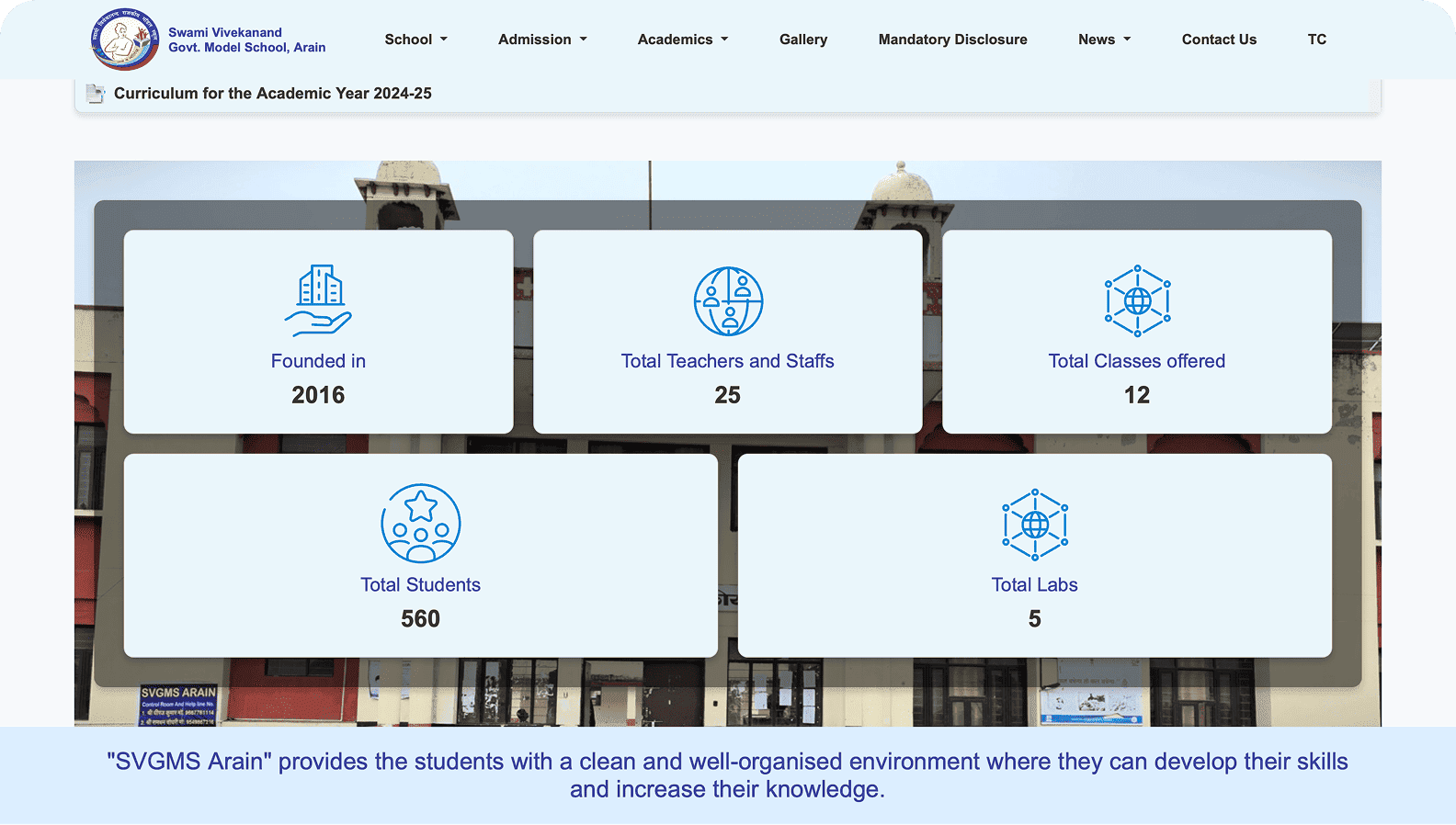
Notice the separate routes to admissions, academics, mandatory disclosure and contact information. A visitor does not have to guess which decorative homepage panel contains an important document.
For a new school, borrow that clarity—not the established-school statistics. Replace unavailable results with a candid opening plan, the confirmed team and information parents need now. Keep important disclosure documents accessible where applicable.
The SVGMS Arain portfolio shows our design work. This screenshot does not establish launch performance, accessibility compliance or an admissions increase; those would require separate evidence.
Test what happens after a parent enquires
A form is not the entire admissions process. Someone must receive the enquiry, understand it, reply and record the next agreed step. Decide who owns that work before paying to generate more of it.
Worked example · Illustrative, not a client result
Imagine a parent looking for a new preschool near home. They find the launch page on their phone and request information about the opening-year programme. A useful journey might look like this:
- Relevant information. The page gives the location, age groups, intended opening and current visit options.
- A short enquiry. The parent supplies their name, preferred contact method and the programme of interest. The first contact does not require a child’s identity documents.
- A clear acknowledgement. The page confirms receipt, explains the next step and states a response window the team can actually meet.
- A named owner. The enquiry reaches the admissions inbox or CRM and is assigned to a staff member, with cover for absences.
- An agreed follow-up. Staff answer questions and, if appropriate, confirm a safe visit with the date, location and contact details. They record the outcome rather than repeatedly sending generic messages.
For K–12, the same chain may start with a question about an offered class, academic continuity or transport. Adapt the information and questions; do not make every family pass through a preschool-focused script.
The acceptance test: send a clearly labelled test enquiry from a phone. Check the acknowledgement, actual inbox or CRM record, staff notification and reply. Then test an invalid submission and a failed connection. A success message alone is not proof of delivery.
Collect only what this stage needs. Explain the purpose of contact and how information will be handled, limit staff access and agree retention and follow-up practices. This is practical data minimisation, not a claim that a short form satisfies every privacy obligation.
If WhatsApp is offered, test the link and who monitors the number. Opening the app does not mean a message was sent. Provide another route for parents who do not want to use it.
Separately, decide how you will manage student records, fees and parent communication once pupils enrol. Compare systems against those tasks; Schylva, operated by Remonthub, is one option to evaluate.
Set up local visibility without pretending you are already open
Use the school’s real name and consistent location details on the website and relevant profiles. Describe the actual locality and classes in natural language. A clear location page is more useful than a stack of near-identical pages for neighbourhoods you do not serve.
Google Business Profile before opening
For an eligible business, Google allows a future opening date up to one year ahead and says the verified profile appears 90 days before opening. Use the genuine date; this is a profile feature, not a recommendation to delay your website until then. See Google’s future-opening guidance.
Follow Google’s representation and eligibility rules for the location, name and category. Do not add promotional keywords to the business name or choose an inaccurate category. Google lists schools and universities among businesses that should not provide ordinary opening hours; explain admissions-office availability and visit arrangements clearly on your website.
Do not build a K–12 launch plan around Google reviews
Google disables reviews and ratings for profiles primarily categorized as general educational institutions serving ages 6–18. Some other types, including daycare centres, are excluded. Check the actual category and Google’s school-review policy; preschool and K–12 advice cannot simply be identical.
Even for otherwise eligible categories, Google does not allow users to post reviews or photos until the business is officially open. After opening, any available reviews must reflect genuine experience. Do not buy testimonials, incentivise reviews or ask people to describe teaching they have never experienced. A change of category is not a workaround for a school that is accurately categorized.
Make the website discoverable, then monitor it
Ask your developer to check that important public pages load, can be crawled and are not accidentally marked noindex. Include them in the sitemap and verify the site in Search Console. Indexing and a Business Profile do not guarantee rankings; our indexing-versus-ranking guide explains the distinction.
Preschool and K–12 founders need different answers ready
There is overlap, but a generic school marketing plan misses important questions. Use this as a prompt for your own parent-information brief, not a claim that every family has the same priorities.
| Question area | Preschool | K–12 |
|---|---|---|
| Who can join? | Age groups, programme options, session length and any daycare provision | Classes offered in the first year, entry process and future expansion clearly separated |
| What happens each day? | Settling-in approach, routines, meals, toileting support and parent communication | Learning approach, subjects, academic leadership, assessment and continuity |
| What must be verified? | Actual staffing, supervision arrangements, facilities and applicable permissions | Exact recognition or affiliation status, applicable disclosures, staffing and facilities |
| Can the family reach you? | Drop-off, collection arrangements and any genuinely available transport | Commute, confirmed transport coverage, visit arrangements and office contact |
| What proof is available? | Actual spaces, appointed team and accurately described experiences | The same, plus clear academic and institutional information; no invented results or review campaign |
If you serve both, provide distinct routes to each offer. Show only the classes and services actually available at opening. A long-term vision can have its own section, clearly labelled as future plans.
Choose channels after the information and enquiry route are ready
Build your calendar around the intended opening, local parent decision periods, approved admissions activity and operational readiness. Do not borrow a single national admissions calendar for every state, board and preschool.
The following is our recommended sequence, not a mandatory timetable. Give each stage a real date and an owner in your plan.
| Stage | Work to complete | Ready to move on when… |
|---|---|---|
| Define | Catchment, opening-year offer, claims, fees, responsibilities and account ownership | The founder can approve accurate parent-facing information. |
| Prepare | Website, genuine visuals, contact route, staff answers and visit process | A mobile test enquiry reaches its owner and gets a useful response. |
| Introduce | Eligible local listings, progress updates, community introductions and relevant content | Parents can understand the status and take an appropriate next step. |
| Invite | Safe visits or information sessions, focused campaigns and follow-up | The team has capacity, truthful messages and a tested landing page. |
| Improve | Review questions, enquiries, visits, channel costs and missing information | Changes follow evidence rather than whichever post received the most likes. |
Start with relevant local reach
Define a plausible catchment using the actual location, commute and confirmed transport—not an arbitrary radius copied from another campaign. Introduce the school through relevant neighbourhood organisations and permitted community channels. Ask group administrators before posting; do not scrape parent numbers or mass-message strangers.
Give each introduction a useful destination: the opening information, an actual programme explanation or a visit-request page. Offline flyers and signage can use a tested QR code plus a readable URL and phone number.
Publish answers, not an endless stream of posters
Explain the daily routine, introduce appointed staff, show dated progress and answer real questions from enquiries. If facilities are unfinished, show that honestly. Choose a sustainable posting rhythm and use the language your local audience understands.
Information sessions can help parents meet the team and ask questions. Confirm safe access and who will answer questions before inviting families. If the campus cannot host visitors, describe the actual alternative rather than advertising a campus tour.
Use paid campaigns as a controlled test
Separate setup costs from media spend and staff time. Target parents or guardians, align each advertisement with the available offer and send visitors to a relevant page. Set a budget you can afford to test; do not promise a universal cost per admission.
Record the source, relevant class or programme, whether staff reached the parent, and the agreed next step. Review qualified enquiries, booked visits and attended visits separately. A click, a WhatsApp opening and a submitted form are three different events—not three admissions.
Your new-school promotion checklist
Give every item one accountable owner. A task is complete when its acceptance test passes, not when someone says it has been “handled.” Adapt these roles to your team.
| Deliverable / owner | Dependency | Completion test |
|---|---|---|
| Approved information Founder + responsible advisers | Opening-year offer and evidence for claims | Website, brochure and staff script agree on what is confirmed, planned and pending. |
| Parent-ready website Content owner + web team | Approved copy, real visuals and applicable documents | On a phone, a parent can find location, classes, fees information and the next step. |
| Working enquiries Admissions owner + web team | Staff inbox or CRM, cover and response process | A test enquiry is received, acknowledged, assigned and answered; failure states work. |
| Visit readiness Operations + admissions | Safe arrangements and staff availability | The invitation describes the correct venue, confirmation process and what can be seen. |
| Search and local setup Website / marketing owner | Accurate location, eligible profiles and public pages | Details are consistent, opening status is honest, sitemap and indexing controls are checked. |
| Campaign and review plan Marketing + admissions | Tested journey, staff capacity and agreed budget | Each channel has a destination, source tracking, owner and date to review qualified enquiries. |
Turn the checklist into your launch plan.
Add your dates, owners, dependencies and readiness notes. Print it for the founder, admissions lead and website team. No email gate.
Open the printable launch worksheet ↗If an item is blocked, change the campaign promise or resolve the dependency. More traffic cannot confirm an unfinished facility, answer an unread enquiry or make an inaccurate affiliation claim true.
Questions founders ask before launch
How early should we start promoting a new school?
Start preparing information and the enquiry process before asking parents to take action. Work backwards from your intended opening, local admission decisions and the dates when you can honestly show the campus, team and offer. There is no single launch timetable that fits every Indian preschool and K–12 school. An awareness announcement can precede admissions, but make that distinction explicit.
Can we market a school while the campus is still being built?
You can describe genuine progress without presenting unfinished facilities as ready. Date progress photographs, label architectural renders, distinguish planned facilities from available ones and explain what a parent can actually do now. Do not invite families into an unsafe construction area. Have the responsible advisers check claims and permissions before advertising admissions.
What should a new school website include?
Start with the location, intended opening, available classes or age groups, learning approach, leadership, fees and admissions information, actual facilities and a clear enquiry route. Explain which details are confirmed and which are pending. Add the disclosures and documents applicable to your school’s status, and make the information usable on a phone.
Can a school appear on Google Maps before opening?
An eligible business can set a future opening date on its Google Business Profile. Google allows a date up to one year ahead and says the verified profile appears 90 days before opening. Use the genuine location, category and date, and check Google’s current eligibility guidance. The profile is not a guarantee of prominent local rankings.
Should a new school ask for Google reviews?
Do not make reviews a universal school-launch tactic. Google disables reviews for profiles primarily categorized as general educational institutions serving ages 6–18. Some other categories, such as daycare, are excluded. Even where reviews are available, only genuine experience should be reviewed; do not invent parent testimonials or change the category to bypass a restriction.
How much should we spend on school promotion?
Set the budget after defining your catchment, available classes, readiness, channels and staff capacity. Separate website and content setup from advertising, events and follow-up costs. Begin with a test you can afford and service properly, then compare qualified enquiries and attended visits. A universal cost-per-admission estimate would hide too many differences between schools.
Google policy references checked on 22 November 2026. Recheck the linked official guidance when setting up a profile. This article is marketing guidance, not legal, affiliation or admissions advice.
Opening a school? Start with the parent journey.
Tell us your city, intended opening date, classes or age groups, and what is already in place. We can help scope the website, branding and launch marketing around a clear, working enquiry process.
Discuss your school launch with Remonthub →
A useful first brief needs your plans—not children’s names or student records.