

Your new site looks better. It works on mobile. The brand finally matches the deck. And six weeks after launch, organic traffic is down sixty percent and nobody can tell you why.
This is one of the most expensive failures in web development, and the mechanical version is largely preventable. Rankings are not lost because Google dislikes a colour palette. They are lost when a redesign quietly changes the things search engines use—URLs, internal links, page copy and markup—and nobody records what those things used to be.
A redesign is not a visual project with some SEO attached at the end. It is a migration. Treating it as one is the whole difference.
What actually kills rankings in a redesign
Not the design. Five specific mechanical changes cause most of the avoidable damage.
1. URLs change and nothing redirects
Often the most destructive mistake: /services/web-design becomes /what-we-do/websites, and every link and ranking signal pointing at the old address now reaches a 404. Without a redirect, Google has no direct migration signal that connects the old page with the new one.
This is the difference between carrying a page's history into the new structure and asking a replacement URL to establish itself from scratch.
2. Content gets shorter
Redesigns are usually driven by design. Design prefers whitespace. So the 900-word service page that answered eleven customer questions becomes a 120-word page with a polished hero and three icons.
The page still exists, but it no longer contains much of the evidence and context that made it a useful match for those searches. Remove the substance and the previous rankings may no longer make sense.
3. Internal links vanish into the navigation
Old sites accumulate contextual links: body copy pointing at related pages, footers linking to key services and blog posts referencing each other. New designs often replace those paths with a clean mega-menu.
Those contextual links helped people discover related answers and helped search engines understand which pages mattered. Strip them out and the site loses useful relationships, even if every URL is technically still live.
4. New URLs never get indexed
Even with correct redirects, genuinely new URLs have to be discovered, crawled and indexed before they can rank. If the sitemap is stale, internal linking is thin or the pages contain little useful information, they can sit in limbo.
We have written about both failure states in detail: pages where Google crawls but does not index, and pages that are indexed but still do not rank. A redesign can produce either one at scale.
5. Staging blocks stay on after launch
Keep staging private with authentication or password protection where possible. A noindex directive only works when a crawler can reach the URL and read it; a robots.txt disallow controls crawling but is not a reliable way to keep a URL out of search. Whatever temporary controls the team uses, they must be removed or replaced at launch. Otherwise the new site can look perfect to every human checking it while search engines are still blocked.
Before anyone opens Figma: the pre-redesign audit
You cannot protect what you have not recorded. Capture the baseline while the old site is live, because the evidence becomes harder to reconstruct after launch.
- Export the complete URL list. Reconcile the sitemap, CMS and a crawler. Each source can reveal pages the others miss.
- Export current search performance. Save the available queries, positions, clicks and impressions you will use as the baseline. Search Console provides up to 16 months of Performance data, but omits anonymised queries and limits exported rows; use its API or bulk export when you need a durable, larger history.
- Identify the pages that actually earn. Sort by clicks and conversions. Protect the URLs, content and structure of the pages that create disproportionate value.
- Export your backlinks. Record which external sites link to which pages so those destinations are preserved or redirected deliberately.
- Record the technical baseline. Save Core Web Vitals, indexed-page counts and the structured data currently in use.
- Screenshot Search Console. Capture the Performance, Page indexing and Core Web Vitals reports before the data changes.
The redirect map is the whole ballgame
If you do one thing from this article, do this one.
A redirect map is a spreadsheet with two columns: every old URL and the new URL it should point to. It gets built before launch, not after somebody notices the traffic drop.
| Rule | Why it matters |
|---|---|
| Use 301 or 308 for a permanent move | The permanent status tells search engines the new URL should replace the old one. Use a temporary redirect only when the move really is temporary. |
| One hop, not a chain | Old → new is faster and easier to audit than old → interim → new. Chains add latency and extra crawling work. |
| Map to the closest equivalent | A blanket redirect to the homepage can be treated like a soft 404 when it is not a relevant replacement. |
| Give every old URL a decision | The map forces the team to redirect, retain or retire each address deliberately instead of discovering omissions in Search Console later. |
| Keep the map after launch | It becomes the evidence trail when a ranking or 404 needs explaining in month two. |
Google's official redirects guidance recommends permanent server-side redirects for permanent URL changes and direct destinations where possible.
When content is genuinely gone, redirect only if a relevant replacement exists. Otherwise return a proper 404 or 410. A clean not-found response is more honest than sending every retired page to an unrelated homepage.
Test the map before launch. Run every old URL through the planned redirect configuration and confirm it returns one permanent hop to a live 200 page. It is tedious—and one of the highest-value checks in the project.
What people forget to carry over
The redirect map gets attention. These often do not.
Title tags and meta descriptions. Export the old ones and decide which to preserve or improve. Do not let a new template make the decision silently.
Heading structure. Keep a descriptive H1 and a useful hierarchy instead of replacing the topic with an empty brand slogan.
Image alt text. Migrate meaningful alternatives with the images for accessibility and image-search context.
Structured data. Article, FAQ, LocalBusiness, Product and Breadcrumb markup must be rebuilt in the new templates; it does not transfer itself.
Contextual internal links. Preserve the links inside body copy that explain how one page relates to another.
Canonical logic. Give each chosen canonical page a self-referencing canonical; duplicate or alternate URLs should point to that version. Keep trailing slashes, casing, redirects, internal links and the www/non-www hostname consistent.
Launch day: the list
Run it in order. None of these checks should be left to memory.
- Remove noindex directives. Check the rendered HTML of live pages, not only the CMS setting.
- Replace the staging robots.txt. Confirm the live file allows the pages that should be crawled and points to the correct sitemap.
- Regenerate the sitemap. Include canonical live URLs only—no old URLs, redirects or 404s.
- Submit the sitemap. Add it in Google Search Console and Bing Webmaster Tools so both engines have a direct discovery source.
- Spot-check redirects live. Test the highest-value old URLs and confirm each reaches the right page in one hop.
- Verify analytics and tag management. New templates often lose measurement code, which also hides the problem you need to diagnose.
- Request indexing for the priority pages. Use URL Inspection after meaningful changes; repeated requests do not speed crawling, and a request does not guarantee indexing or ranking.
- Check the rendered page. For a JavaScript-heavy build, confirm the content and links search engines receive, not only what your browser paints.
The two weeks after: what is normal and what is not
Normal: some position and index-count movement while Google recrawls changed pages and processes redirects. There is no universal percentage dip that every healthy migration must experience.
Act immediately: a large or sustained traffic drop, important pages disappearing from their queries, indexed pages continuing to fall, a jump in 404s or any live page still carrying noindex.
Use Search Console's Page indexing report for site-wide patterns and URL Inspection for the status of important individual pages. Then filter Performance to the pages and queries from your baseline. Report data can lag, so corroborate it with live tests, crawl activity and server logs.
Do not rush into a broad content rewrite in week one. Diagnose first. A post-launch drop can trace to one mechanical fault—a missing redirect, a leftover noindex directive or a stale sitemap. Fixing the fault is more useful than rewriting a page that search engines cannot reach correctly.
What we learned the hard way
We should be precise, because the internet is full of agencies claiming battle scars they do not have. We did not lose our rankings in a redesign. What happened was quieter: we discovered that a quarter of our own site had never been indexed at all.
Twenty-three pages sat in Search Console under “Crawled – currently not indexed.” Seventeen were portfolio pages—a heading, a set of images and not one sentence explaining who the client was, what the problem had been or what we actually did. They looked finished. To a search engine they said almost nothing.
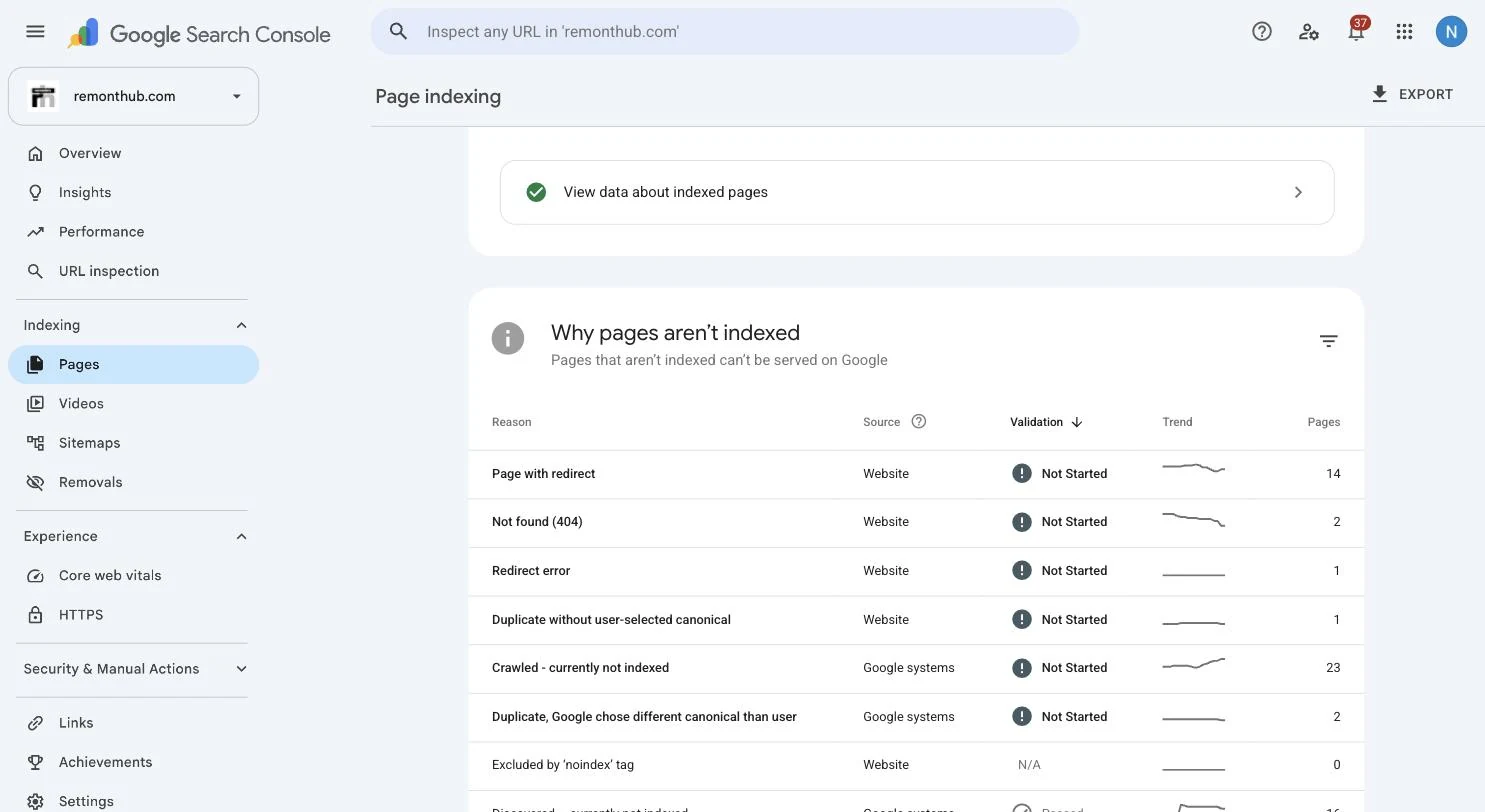
We gave those pages a reason to exist—150 to 300 words of genuine context, fewer near-duplicates and better links from established pages. Then we requested indexing once. The next useful article we published appeared in the index the same day. That is our observation, not a guaranteed result of requesting indexing.
The redesign lesson is direct: image-led, text-light pages are exactly what a design-driven migration can produce at scale. Our seventeen pages were the slow version of that failure. A redesign can ship it across a whole site on launch day.
Read the complete diagnosis in what “crawled – currently not indexed” actually means. For the wider problem, start with why a website is not visible on Google.
Questions to ask before anyone touches your site
If you are hiring for a redesign, these separate teams that have managed a migration from teams that have only delivered a visual refresh.
- Will any URLs change, and can I see the redirect map before launch? The useful answer is a spreadsheet, not reassurance.
- How will you preserve the content on my top-performing pages? They should ask which pages those are—or arrive with the data.
- What happens to current titles, descriptions and structured data? “The CMS handles it” is not a migration plan.
- Who submits the sitemap and checks indexing, and when? Look for a named owner and date.
- What is the rollback plan if organic traffic drops? Any concrete answer beats a denial that it could happen.
- Who removes the staging crawl blocks on launch day? Blocking staging and unblocking production are one task.
A team that answers these easily has usually thought about the migration. For the wider selection process, use our guide to how to choose a web design agency.
Questions we get a lot
Does a website redesign affect SEO?
A redesign can affect SEO when it changes URLs, crawlability, rendered content, internal links, canonicals or page content. A visual-only redesign that preserves those elements may have little search impact. Significant URL changes can cause temporary fluctuations while Google recrawls and reindexes.
How do I redesign a website without losing SEO?
Record what you have before you change it: a full URL export, current rankings, top pages and backlinks. Build a one-to-one permanent redirect map from every old URL to its closest new equivalent. Carry over title tags, headings, body content, alt text, structured data and contextual internal links. On launch day, remove staging noindex tags, replace robots.txt, regenerate and submit the sitemap, and verify redirects live. Then monitor Search Console against your baseline.
How long does it take to recover rankings after a redesign?
Google does not publish a fixed recovery window. For a small or medium site move, most URLs may transition over a few weeks; larger sites can take longer. Timing depends on the number of URLs, server speed, what changed and whether technical faults remain. Visibility may not fully return where content or relevance changed materially.
Should I keep my old URLs in a redesign?
Where you reasonably can, yes. Keeping established URLs removes redirect and URL-remapping risk, but it does not eliminate risks caused by changes to content, internal links, rendering, canonicals or indexing directives. Change a URL when there is a real structural reason, then use a direct permanent redirect to the closest equivalent page.
Do I need to tell Google about a redesign?
There is no separate redesign notification for a rebuild on the same domain. Publish an updated sitemap, keep internal links current and let Google recrawl. If the redesign also moves to a new domain, use Search Console's Change of Address process in addition to the redirect plan.
My traffic dropped after launch. Where do I look first?
Check a live page for a leftover noindex tag; check robots.txt is not blocking crawlers; inspect Search Console for a jump in 404s; test your highest-value old URLs for direct permanent redirects; and confirm the sitemap contains only live canonical URLs. These checks cover common mechanical migration faults and should come before a rushed content rewrite.
Redesigns should gain you rankings, not cost them.
A migration done properly is an opportunity to improve structure, speed and content together. Done carelessly, it can disconnect search visibility from the pages that earned it.
Planning a redesign and want the search side handled as part of the build? Talk to our team—or see how we approach website design and development.